Enabling AT-TLS for multi-service deployment mode


 Twitter
 LinkedIn
 Facebook
 Email
EmailEnabling AT-TLS for multi-service deployment mode
Configuring AT-TLS allows Zowe to offload all TLS responsibilities to the z/OS Communications Server, simplifying security configuration and ensuring consistent encryption across the network.
This article describes the use of AT-TLS in multi-service deployment mode. Beginning with Zowe v3.4.0 and for later versions, we recommend the use of single-service deployment mode.
- To review the benefits of running Zowe in single-service deployment mode, see Enabling Single-Service deployment of API Mediation Layer.
- For details about configuring AT-TLS for single-service deployment mode, see Enabling AT-TLS for single-service deployment mode.
Zowe's core components use TLS networking as well as support AT-TLS as an alternative. The built-in TLS networking is enabled by default. For details about this built-in TLS support, see Customizing Native TLS.
As a security administrator, you can configure parameters in Zowe Server to switch from native TLS to AT-TLS. Review this article for information about AT-TLS inbound and outbound rules, and the required configuration to use AT-TLS in high availability. You can also find troubleshooting tips as well as security recommendations.
AT-TLS configuration for Zowe
Configuration to support AT-TLS is set in the following section of the zowe.yaml file:
zowe:
  network:
    # For inbound traffic rules:
    server:
      tls:
        attls: true
    # If outbound traffic rules will be configured:
    client:
      tls:
        attls: true
While TLS is not handled by the Zowe Server components with AT-TLS enabled, API Mediation Layer (API ML) requires information about the server certificate that is defined in the AT-TLS rule. Ensure that the server certificates provided by the AT-TLS layer are trusted in the configured Zowe keyring.
- We strongly recommend that AT-TLS for inbound connections and outbound connections with X.509 Client Certificate authentication be configured with the same Zowe keyring as in
zowe.yaml. - For outbound connections without an X.509 Client Certificate authentication, make sure you use a keyring that contains only the trusted public CA certificates, but does not contain a private key.
- As the API Gateway is a core component of API ML, other components that need to interact with the API Gateway, such as Zowe App Server, also require AT-TLS configuration.
- Do not set
attls: truetogether withminTlsormaxTls. Zowe does not handle TLS in AT-TLS aware mode.
Configuring AT-TLS for Zowe requires careful consideration of security settings. These security settings apply to the X.509 Client Certificate authentication feature in Zowe API Mediation Layer components, as well as for onboarded services that support the X.509 Client Certificates authentication scheme.
Outbound AT-TLS rules (i.e. to make a transparent https call through http) that are configured to send the server certificate should be limited to the services that require service to service authentication. If an API ML-onboarded service needs to support X.509 Client Certificate authentication, we recommend to use the integrated TLS handshake capabilities of API ML. Do not configure an outbound AT-TLS rule for these services. Doing so can result in the authentication of the Zowe Server user, rather than the authentication of the end user.
Zowe v3 includes a new component named ZAAS (Zowe Authentication and Authorization Service). In AT-TLS-aware mode with multi-service deployment mode enabled, calls to this service are all internal between API ML components. These internal calls between the API Gateway and ZAAS must include the X.509 Client Certificate. With the recommended single-service deployment mode enabled, these calls are internal to Zowe, and require no configuration in AT-TLS.
Required Keyrings
To comply with security settings, Zowe AT-TLS setup requires two keyrings:
Keyring with a private key
This keyring is used for inbound connections and outbound connections that require X.509 Client Certificate authentication. This keyring contains trusted public CA certificates and a Zowe server certificate with its corresponding private key.
We strongly recommend that you use the same Zowe keyring as in zowe.yaml.
- If the southbound service supports X.509 client certificate authentication, then AT-TLS cannot be used.
- No internal calls in non-HA single-service deployment mode require X.509 client certificate authentication.
Keyring without a private key
This keyring is used for outbound connections that do not require nor prohibit X.509 Client Certificate authentication. This keyring contains only the trusted public CA certificates. We recommend creating a new keyring, similar to the previously mentioned keyring with a private key, but without the private key.
AT-TLS rules
This section describes suggested AT-TLS settings, and serves as guidelines to set your AT-TLS rules.
Comments are added inline to aid in filling the details. Make sure to remove these comments in the resulting z/OS configuration as these comments may be read by the interpreter.
Common configuration items
The following configuration is reused in various rules. Use these configuration snippets as a reference.
TTLSGroupAction ServerGroupAction
{
  TTLSEnabled On
}

TTLSEnvironmentAction ZoweServerEnvironmentAction
{
  HandshakeRole ServerWithClientAuth
  EnvironmentUserInstance 0
  TTLSEnvironmentAdvancedParmsRef ServerEnvironmentAdvParms
  TTLSKeyringParmsRef ZoweKeyring
}

TTLSConnectionAction ZoweServerConnectionAction
{
  HandshakeRole ServerWithClientAuth
  TTLSCipherParmsRef CipherParms
  TTLSConnectionAdvancedParmsRef ZoweConnectionAdvParms
}

TTLSEnvironmentAdvancedParms ServerEnvironmentAdvParms
{
  ClientAuthType Full # Support optional X.509 Client Certificate authentication
  ApplicationControlled Off
  Renegotiation Disabled
  SSLv2 Off
  SSLv3 Off
  TLSv1 Off
  TLSv1.1 Off
  TLSv1.2 On
  TLSv1.3 On
}

TTLSConnectionAdvancedParms ZoweConnectionAdvParms
{
  ApplicationControlled Off
  ServerCertificateLabel apimlcert # Specify the personal server certificate used for the Zowe Server
  CertificateLabel apimlcert # Specify the personal server certificate used for the Zowe Server
  SecondaryMap Off
}

TTLSGroupAction ClientGroupAction
{
  TTLSEnabled On
}

TTLSEnvironmentAction ApimlX509ClientEnvAction
{
  HandshakeRole Client
  TTLSKeyringParmsRef ZoweKeyring
  TTLSEnvironmentAdvancedParmsRef ClientEnvironmentAdvParms
}

TTLSConnectionAction ApimlX509ClientConnAction
{
  HandshakeRole Client
  TTLSCipherParmsRef CipherParms
  TTLSConnectionAdvancedParmsRef ApimlClientX509ConnAdvParms
}

TTLSEnvironmentAdvancedParms ClientEnvironmentAdvParms
{
  Renegotiation Disabled
  3DesKeyCheck Off
  ClientEDHGroupSize Legacy
  ServerEDHGroupSize Legacy
  PeerMinCertVersion Any
  ServerScsv Off
  MiddleBoxCompatMode Off
  CertValidationMode Any
}

TTLSConnectionAdvancedParms ApimlClientX509ConnAdvParms
{
  CertificateLabel Zowe Server # Label of personal certificate in the ZoweKeyring
  ApplicationControlled Off
  SecondaryMap Off
}

TTLSGroupAction ServerGroupAction
{
  TTLSEnabled On
}

TTLSEnvironmentAction ApimlNoX509ClientEnvAction
{
  HandshakeRole Client
  TTLSKeyringParmsRef ZoweNoX509Keyring
  TTLSEnvironmentAdvancedParmsRef ClientEnvironmentAdvParms
}

TTLSConnectionAction ApimlNoX509ClientConnAction
{
  HandshakeRole Client
  TTLSCipherParmsRef CipherParms
  TTLSConnectionAdvancedParmsRef ApimlClientNoX509ConnAdvParms
}

TTLSEnvironmentAdvancedParms ClientEnvironmentAdvParms
{
  Renegotiation Disabled
  3DesKeyCheck Off
  ClientEDHGroupSize Legacy
  ServerEDHGroupSize Legacy
  PeerMinCertVersion Any
  ServerScsv Off
  MiddleBoxCompatMode Off
  CertValidationMode Any
}

TTLSConnectionAdvancedParms ApimlClientNoX509ConnAdvParms
{
# No CertificateLabel; Keyring contains no X.509 Client Certificate
  ApplicationControlled Off
  SecondaryMap Off
}
Keyring configuration
# Keyring with trusted CA certificates and Zowe server certificate with its private key
TTLSKeyringParms ZoweKeyring
{
  Keyring ZWEKRNG
}

# Keyring without a default personal certificate and its private key; contains only trusted CA certificates
TTLSKeyringParms ZoweNoX509Keyring
{
  Keyring ZoweAttlsKeyring
}

* __`ZoweNoX509Keyring`__
This parameter is used for outbound rules that do not require or prohibit X.509 Client Certificate authentication, is distinct from `ZoweKeyring`. Refer to the complete PAGENT rules in the [Full example of AT-TLS configuration](#full-example-of-at-tls-configuration).
Inbound rules
The following diagram illustrates inbound rules when Zowe is deployed in single-service mode:
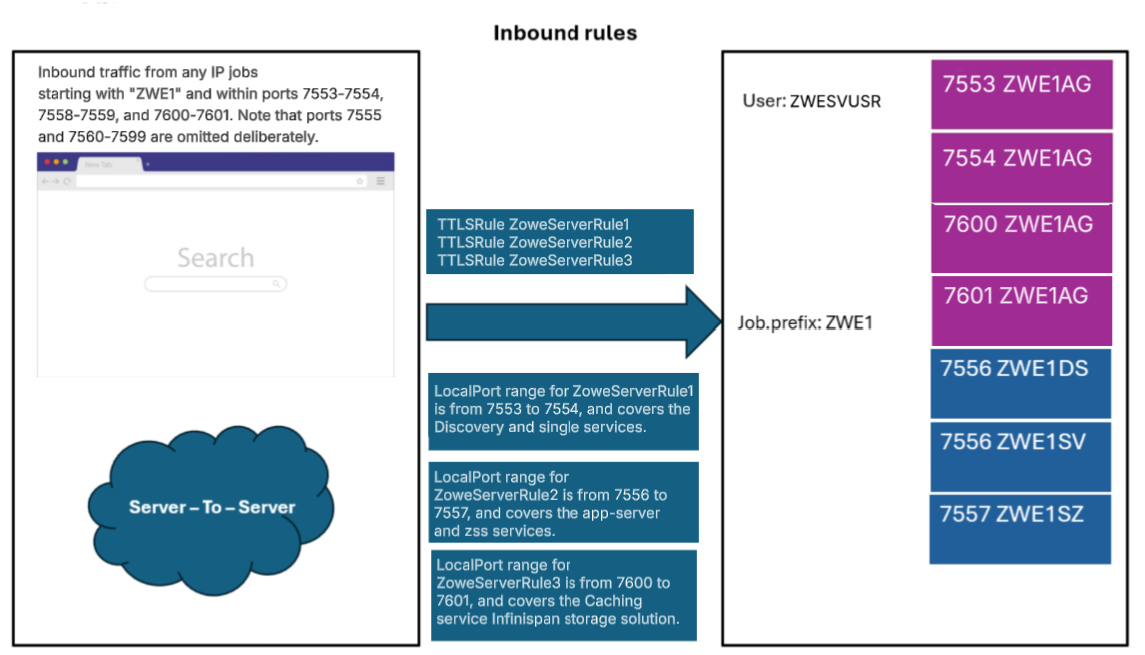
- Define a generic inbound rule that can be set for all Zowe services. Note that port 7555 is excluded intentionally in order to allow for compatibility with multi-service deployment mode. As such, the configuration is split into two inbound rules as presented in the following rules section:
Note: Rules can be unified into one if they are using contiguous ports.
TTLSRule ZoweServerRule1
{
  LocalAddr All
  RemoteAddr All
  LocalPortRange 7552-7555 # Zowe API Mediation Layer services
  Jobname ZWE1* # Jobname according to zowe.job.prefix in zowe.yaml
  Direction Inbound
  TTLSGroupActionRef ServerGroupAction
  TTLSEnvironmentActionRef ZoweServerEnvironmentAction
  TTLSConnectionActionRef ZoweServerConnectionAction
}

TTLSRule ZoweServerRule2
{
  LocalAddr All
  RemoteAddr All
  LocalPortRange 7556-7557 # App server and ZSS
  Jobname ZWE1* # Jobname according to zowe.job.prefix in zowe.yaml
  Direction Inbound
  TTLSGroupActionRef ServerGroupAction
  TTLSEnvironmentActionRef ZoweServerEnvironmentAction
  TTLSConnectionActionRef ZoweServerConnectionAction
}

# Optional, use if enabling Caching Service in ininispan storage mode
TTLSRule ZoweServerRule3
{
  LocalAddr All
  RemoteAddr All
  LocalPortRange 7600-7601 # Caching-service infinispan ports
  Jobname ZWE1* # Jobname according to zowe.job.prefix in zowe.yaml
  Direction Inbound
  TTLSGroupActionRef ServerGroupAction
  TTLSEnvironmentActionRef ZoweServerEnvironmentAction
  TTLSConnectionActionRef ZoweServerConnectionAction
}
-
Verify port ranges.
noteThe required port ranges depend on your deployment mode.
Port number Category Component Default Jobname 7552 API Mediation Layer api-catalog ZWE1AC 7553 API Mediation Layer discovery ZWE1AD 7554 API Mediation Layer gateway ZWE1AG 7555 API Mediation Layer caching-service ZWE1CS 7556 App Framework app-server ZWE1DS & ZWE1SV 7557 App Framework zss ZWE1SZ 7558 API Mediation Layer zaas ZWE1AZ 7600 API Mediation Layer caching-service ZWE1CS 7601 API Mediation Layer caching-service ZWE1CS For more information on each component's networking requirements, see Addressing network requirements.
-
Apply your keyring and configure the handshake role.
i. In the following keyring configuration, replace
ZWEKRNGto reference your environment's keyring with a private key.TTLSKeyringParms ZoweKeyring{Keyring ZWEKRNG}For additional details, see Keyring with a private key.
ii. Verify the
HandshakeRolesetting.Ensure
HandshakeRoleis set toServerWithClientAuthfor core Zowe services. This setting enables the API Gateway to accept X.509 Client Certificates from API Clients.iii. (Optional) Separate rules by certificate requirements.
- For services that require X.509 client certificate authentication (e.g., Discovery Service, API Gateway Service, ZAAS), keep
HandshakeRoleasServerWithClientAuth. - For services that do not require X.509 client certificates (e.g., API Catalog), create separate TTLS rules with
HandshakeRoleasServer.
- For services that require X.509 client certificate authentication (e.g., Discovery Service, API Gateway Service, ZAAS), keep
For more information about the use of SAF keyrings with API ML, see API ML SAF Keyring in the article Managing certificates in Zowe API Mediation Layer.
- Refresh PAGENT and verify the contents.
- Refresh the policy configuration by issuing the MVS command:
F PAGENT,REFRESH. - Test connectivity for all inbound services.
- Ensure services that require client certificate authentication are successfully receiving X.509 Client Certificates.
We recommend that you restart Zowe services after refreshing PAGENT to avoid issues with open connections.
Outbound rules
Outbound rules in this section allow Zowe services to communicate with each other and to other southbound services using HTTP.
Careful consideration needs to be made regarding which rules are to be configured to send an X.509 Client Certificate. Since configuration cannot be performed on a per-request basis, it is essential not to configure the rule to send the Zowe Server certificate to the API Gateway or to a southbound service that supports X.509 Client Certificate authentication. Doing so will result in unintentionally authenticating as the Zowe Server user ID. Make sure to use a Keyring without a private key in such rules.
Outbound rules for communication between Zowe core components
Use the example in this section as a template for internal connections between Zowe core services.
The following diagram illustrates outbound rules between Zowe core components for multi-service deployment mode:
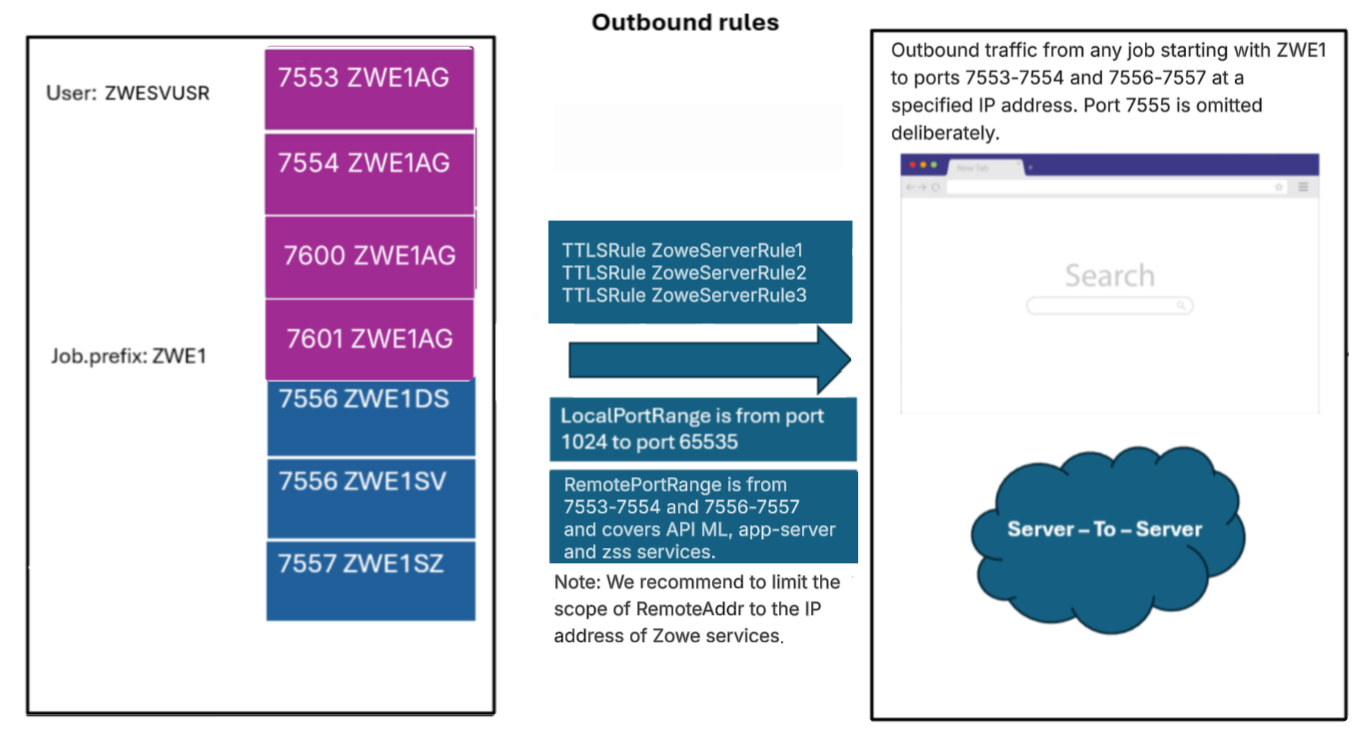
This example rule covers the connection between the API Gateway and ZAAS and the z/OSMF instance, which are required for user authentication on z/OS systems when using z/OSMF as the authentication provider.
# Connection to Zaas from Gateway requires X.509 authentication
TTLSRule ZoweZaasClientRule
{
LocalAddr All
LocalPortRange 1024-65535
RemoteAddr All
RemotePortRange 7558 # ZAAS port
Jobname ZWETAG* # Set according to zowe.job.prefix in zowe.yaml + AG
Direction Outbound
TTLSGroupActionRef ClientGroupAction
TTLSEnvironmentActionRef ApimlX509ClientEnvAction
TTLSConnectionActionRef ApimlX509ClientConnAction
Priority 100
}
# Connection to Caching Service requires X.509 authentication
TTLSRule ZoweCachingServiceClientRule
{
LocalAddr All
LocalPortRange 1024-65535
RemoteAddr All
RemotePortRange 7555 # Caching Service port
Jobname ZWET*
Direction Outbound
TTLSGroupActionRef ClientGroupAction
TTLSEnvironmentActionRef ApimlX509ClientEnvAction
TTLSConnectionActionRef ApimlX509ClientConnAction
Priority 110
}
# ZAAS Can connect to Gateway, in these scenarios it requires X.509 authentication
TTLSRule ZoweGwZaasClientRule
{
LocalAddr All
LocalPortRange 1024-65535
RemoteAddr All
RemotePortRange 7554 # Gateway Service port
Jobname ZWETAZ* # Set according to zowe.job.prefix in zowe.yaml + AZ
Direction Outbound
TTLSGroupActionRef ClientGroupAction
TTLSEnvironmentActionRef ApimlX509ClientEnvAction
TTLSConnectionActionRef ApimlX509ClientConnAction
Priority 110
}
# All Zowe services perform X.509 authentication to onboard to Discovery Service
TTLSRule ZoweDiscoveryClientRule
{
LocalAddr All
LocalPortRange 1024-65535
RemoteAddr All
RemotePortRange 7553 # Discovery Service port
Jobname ZWET* # Set according to zowe.job.prefix in zowe.yaml
Direction Outbound
TTLSGroupActionRef ClientGroupAction
TTLSEnvironmentActionRef ApimlX509ClientEnvAction
TTLSConnectionActionRef ApimlX509ClientConnAction
Priority 100
}
# Fallback rule, connections not covered above, use no X.509 authentication
TTLSRule ZoweTrustClientRule
{
LocalAddr All
LocalPortRange 1024-65535
RemoteAddr All
RemotePortRange 7552-7558
Jobname ZWET*
Direction Outbound
TTLSGroupActionRef ClientGroupAction
TTLSEnvironmentActionRef ApimlNoX509ClientEnvAction
TTLSConnectionActionRef ApimlNoX509ClientConnAction
Priority 50
}
# Connections from Zowe components to App Server and ZSS
TTLSRule ZoweClientRule1
{
LocalAddr All
LocalPortRange 1024-65535
RemoteAddr All
RemotePortRange 7556-7557 # App server and ZSS
Jobname ZWE1* # Set according to zowe.job.prefix in zowe.yaml - this covers all servers within Zowe core.
Direction Outbound
TTLSGroupActionRef ClientGroupAction
TTLSEnvironmentActionRef ApimlX509ClientEnvAction
TTLSConnectionActionRef ApimlX509ClientConnAction # X.509 Client Certificate Authentication is required in cross-service API ML communication
}
# Optional, set if enabling Caching Service with infinispan storage mode
TTLSRule ZoweClientRule2
{
LocalAddr All
LocalPortRange 1024-65535
RemoteAddr All
RemotePortRange 7600-7601 # Caching service infinispan storage
Jobname ZWE1* # Set according to zowe.job.prefix in zowe.yaml - this covers all servers within Zowe core.
Direction Outbound
TTLSGroupActionRef ClientGroupAction
TTLSEnvironmentActionRef ApimlX509ClientEnvAction
TTLSConnectionActionRef ApimlX509ClientConnAction # X.509 Client Certificate Authentication is required in cross-service API ML communication
}
Note the following conditions:
-
If
zowe.network.client.tls.attlsistrue, AT-TLS performs encryption even when requests are issued ashttp. -
If
zowe.network.client.tls.attlsistrueand the z/OSMF rule is not configured in the PAGENT, specifyzOSMF.scheme: httpsin yourzowe.yaml. -
JobnameThis parameter is defined explicitly for the API Gateway and ZAAS component and is formed with thezowe.job.prefixsetting fromzowe.yamlplusAG(Gateway) andAZ(ZAAS) suffixes. ApplyingZWE1A*as a jobname pattern captures both servers.
Outbound rule for communication between API Gateway and southbound services
The following diagram illustrates the rule for the API ML to a southbound service in multi-service deployment mode.
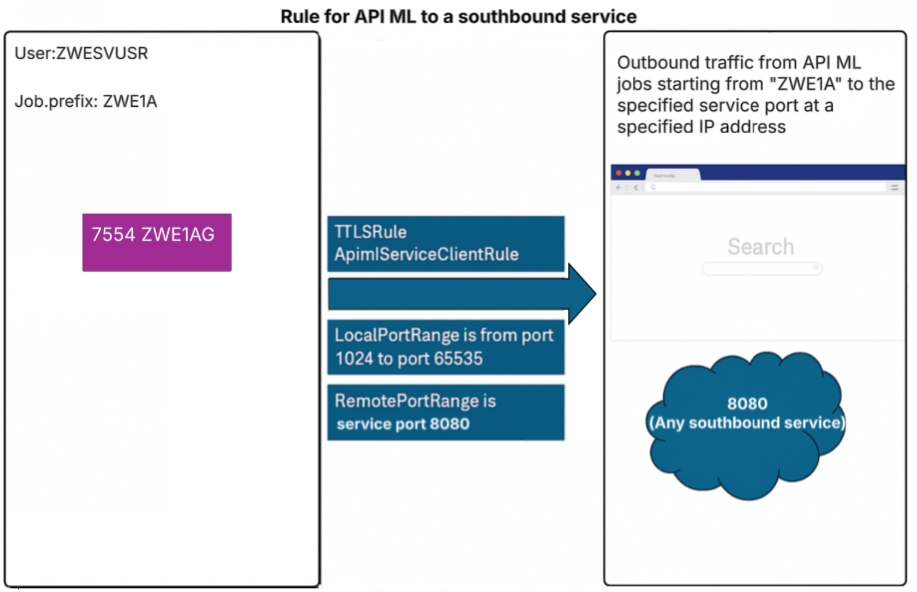
In this example, the rule covers all outbound connections originating from the API Gateway to a server which is not part of Zowe, such as an extension's server, listening on port 8080.
Such a rule can apply to any remote destination, as seen in the ZoweClientRule for Zowe core servers in the section Outbound rules for z/OSMF.
Click to view an example of a rule covering API Gateway to extension servers.
This example covers routing scenarios.
TTLSRule ApimlServiceClientRule
{
LocalAddr All
LocalPortRange 1024-65535
RemoteAddr All
RemotePortRange 8080 # Set to range of ports where services are listening
Jobname ZWE1A* # Generate according to zowe.job.prefix in zowe.yaml
Direction Outbound
TTLSGroupActionRef ClientGroupAction
TTLSEnvironmentActionRef ApimlNoX509ClientEnvAction
TTLSConnectionActionRef ApimlNoX509ClientConnAction # Do not send X.509 Client Certificate
}
If a southbound service, including an onboarded service, supports X.509 client certificate authentication, the API Gateway must not send the Zowe server certificate unless intended. Sending the certificate results in the server authenticating the certificate user.
Outbound rule for services that validate tokens against the API Mediation Layer
Services validating authentication tokens through the API Gateway require an outbound rule to the API Gateway and an onboarding rule to the Discovery Service.
This scenario includes the following services:
- Services that set
zoweJwtas the authentication scheme - Services that require an Open ID Connect (OIDC) token
- Forwarded X.509 certificates
For a full AT-TLS setup we strongly recommend the following conditions:
- Include an Outbound rule from the service to the API Gateway.
- Include an Outbound rule set for the onboarding process against the Discovery Service.
Ensure that the following rules are followed:
- Outbound rule to the API Gateway: Do not send X.509 Client Certificate.
- Outbound rule to the Discovery Service: Sends an X.509 Client Certificate to authenticate during onboarding.
Services running off-host cannot use AT-TLS to make transparent https calls though http. As such, no Outbound rules apply from such services to the API Gateway and the Discovery Service.
Example:
TTLSRule ApimlClientRule
{
LocalAddr ALL
RemoteAddr ALL
LocalPortRange 1024-65535
RemotePortRange 7554 # Gateway port
Jobname # Jobname under which the onboarded service is running
Direction Outbound
TTLSGroupActionRef ClientGroupAction
Priority 150
TTLSEnvironmentActionRef ApimlClientEnvironmentAction # No X.509 authentication
TTLSConnectionActionRef ApimlClientConnectionAction # No X.509 authentication
}
Outbound rule for z/OSMF
The following diagram illustrates outbound rules for z/OSMF in multi-service deployment mode:
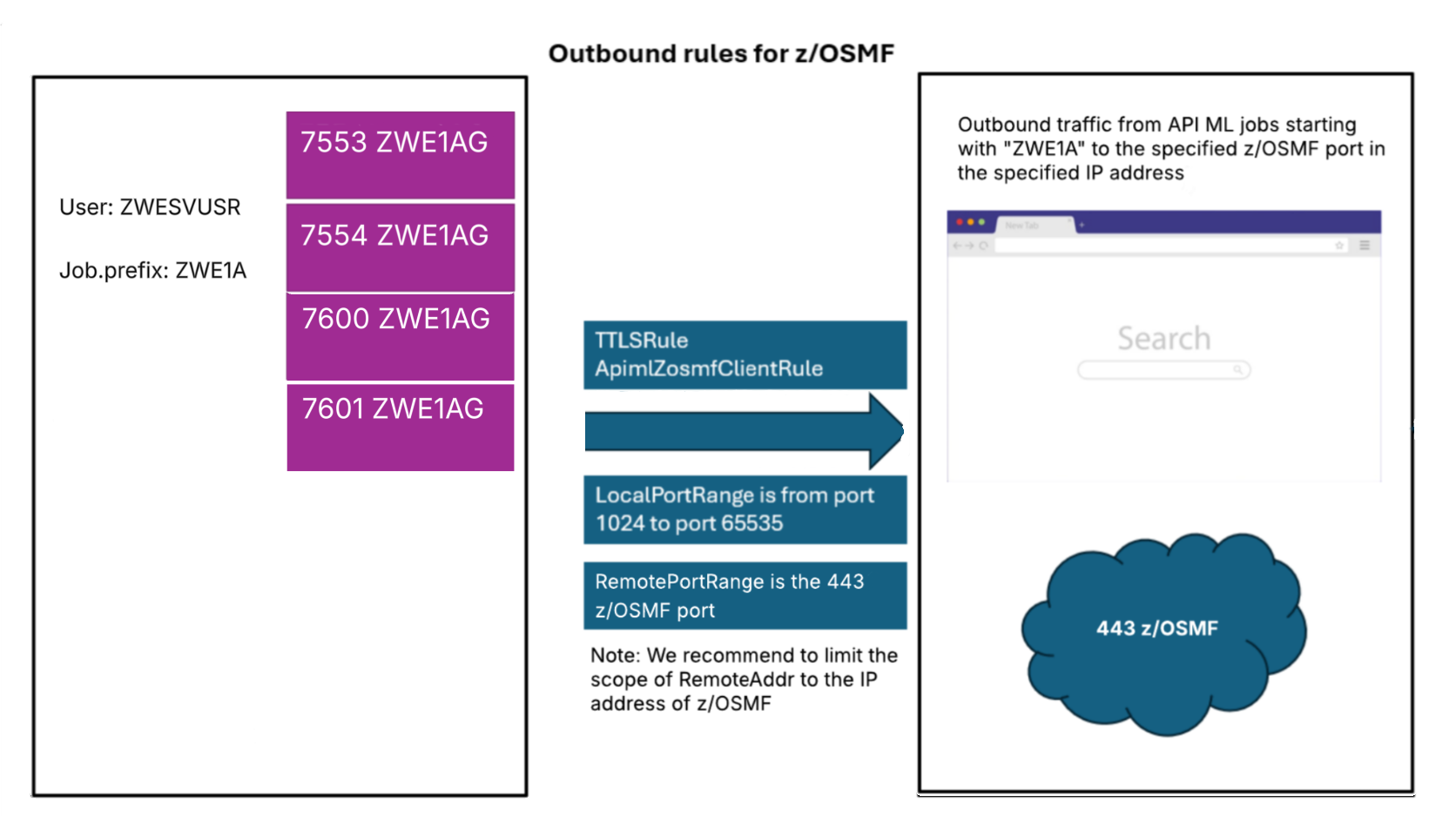
This example rule covers the connection between the API Gateway (and ZAAS in multi-server deployment mode) and the z/OSMF instance. This connection is made to authenticate users in z/OS. The example rule is the same for single-service and multi-service deployment mode.
- If
zowe.network.client.tls.attlsistrue, this rule is assumed set. The requests to z/OSMF are issued usinghttp. - If
zowe.network.client.tls.attlsistrueand z/OSMF rule is not set in the PAGENT, then it is necessary to specifyzOSMF.scheme: httpsin yourzowe.yaml.
TTLSRule ApimlZosmfClientRule
{
LocalAddr All
LocalPortRange 1024-65535 # Using any outbound port
RemoteAddr All
RemotePortRange 443 # Set to z/OSMF port
Jobname ZWE1A* # Set according to zowe.job.prefix in zowe.yaml. Zowe components *AG and *AZ are needed in this rule.
Direction Outbound
TTLSGroupActionRef ClientGroupAction
TTLSEnvironmentActionRef ApimlNoX509ClientEnvAction
TTLSConnectionActionRef ApimlNoX509ClientConnAction # No X.509 Client Certificate required
}
JobnameThis parameter is defined explicitly for the API Gateway and ZAAS component and is formed with thezowe.job.prefixsetting fromzowe.yamlplusAG(API Gateway) andAZ(ZAAS) suffixes. ChoosingZWE1A*as a jobname pattern captures both servers.
Ciphers
This list of ciphers is provided as an example only. Actual ciphers should be customized according to your specific configuration.
The list of supported ciphers should be constructed according to the TLS supported versions. Ensure that the cipher list has matches with non-AT-TLS-aware clients.
Click to view an example of Cipher parameters.
TTLSCipherParms CipherParms
{
V2CipherSuites TLS_RC4_128_WITH_MD5
V2CipherSuites TLS_RC4_128_EXPORT40_WITH_MD5
V2CipherSuites TLS_RC2_CBC_128_CBC_WITH_MD5
V2CipherSuites TLS_RC2_CBC_128_CBC_EXPORT40_WITH_MD5
V2CipherSuites TLS_RC2_CBC_128_CBC_EXPORT40_WITH_MD5
V2CipherSuites TLS_DES_192_EDE3_CBC_WITH_MD5
V3CipherSuites TLS_ECDHE_ECDSA_WITH_AES_128_CBC_SHA256
V3CipherSuites TLS_ECDHE_ECDSA_WITH_AES_256_CBC_SHA384
V3CipherSuites TLS_ECDHE_ECDSA_WITH_AES_128_GCM_SHA256
V3CipherSuites TLS_ECDHE_ECDSA_WITH_AES_256_GCM_SHA384
V3CipherSuites TLS_ECDHE_RSA_WITH_AES_256_GCM_SHA384
V3CipherSuites TLS_AES_128_GCM_SHA256
V3CipherSuites TLS_AES_256_GCM_SHA384
V3CipherSuites TLS_CHACHA20_POLY1305_SHA256
}
Using AT-TLS for API ML in High Availability
When Zowe is configured in High Availability mode, AT-TLS configuration is mostly the same as in a single-instance deployment. The primary difference is that the AT-TLS rules must allow communication across multiple LPARs.
Ensure that the RemoteAddr setting in the rules accounts for the following connections:
- Discovery Service to Discovery Service. This is the replica request.
- API Gateway Service to southbound services (including app-server and ZSS) running in another LPAR.
- API Gateway Service to ZAAS running in another LPAR.
- Southbound services to the Discovery Service on this LPAR, or another LPAR. This applies during onboarding.
- All outbound connections need to include the IP range for all LPARs. Make sure to allow traffic not only to other LPARs but also to the LPAR where the rules are defined, as outbound requests continue to go through AT-TLS.
Multi-tenancy deployment
Most installations do not need this feature
When the Central API ML runs on z/OS with AT-TLS enabled, you must override the external URL protocol so that it matches the outbound AT-TLS behavior. The Central API ML uses this external URL to call the domain API ML and needs to reflect the outbound AT-TLS rule.
In this scenario, update your domain API ML configuration:
zowe:
components:
gateway:
apiml:
gateway:
externalProtocol: http
AT-TLS Troubleshooting
This section describes some common issues when using AT-TLS with Zowe and how to resolve these issues.
The message This combination of host and port requires TLS. is thrown when accessing an API ML service through a Browser
Make sure the URL starts with https://. This message indicates that AT-TLS rules are in place and that an established connection is being attempted on an unsecured port to the API Gateway, however the latter is still only listening on an application-controlled secured port.
Solution: Review settings in the API Gateway. Ensure that the changes described in AT-TLS configuration for Zowe are applied.
AT-TLS rules are not applied
If the application is responding in http, the application may not be properly configured to support http-only calls. AT-TLS is not correctly configured.
Solution:
Ensure the rules are active and that the filters on port range and job names are properly set.
Non matching ciphers / protocols
An error can occur if the list of ciphers or the TLS protocol does not match between the ones configured in the AT-TLS rules and the ones used by non AT-TLS-aware clients.
Solution: Review the supported TLS versions and ciphers used in both the client and the server.
Zowe Desktop IP Explorer or Editor does not work
If the Zowe Desktop IP Explorer or Editor are not working correctly, either by failing to load or showing no data, it means there is a problem accessing the ZSS server.
Solution:
Ensure the components.zss.agent.http.ipAddresses includes a reachable address. If this field unset, it defaults to 127.0.0.1, while other Zowe servers default to 0.0.0.0.
Sample configuration:
components:
zss:
enabled: true
port: 7557
crossMemoryServerName: ZWESIS_STD
agent:
64bit: true
http:
ipAddresses:
- "0.0.0.0"
Additional troubleshooting
When asking for support, make sure to follow IBM guides for troubleshooting AT-TLS problems. For details, see Diagnosing Application Transparent Transport Layer Security (AT-TLS) in the IBM documentation.
Ensure you collect the logs and current configurations when contacting support.
Full example of AT-TLS configuration
Review a full working example of an AT-TLS configuration file on z/OS, specifically used for defining secure communication between different services in a mainframe environment. All port values are examples. The example has comments for readability.
Click here to review the full AT-TLS configuration file for multi-service deployment mode.
########################################################
# ZOWE RULES #
########################################################
# Main inbound rules, all Zowe services have them defined.
TTLSRule ZoweServerRule
{
LocalAddr All
RemoteAddr All
LocalPortRange 7552-7558 # Range covers all possible Zowe services
Jobname ZWE1* # Jobname according to zowe.job.prefix in zowe.yaml
Direction Inbound
TTLSGroupActionRef ServerGroupAction
TTLSEnvironmentActionRef ZoweServerEnvironmentAction
TTLSConnectionActionRef ZoweServerConnectionAction
}
# Connection to Zaas from Gateway requires X.509 authentication
TTLSRule ZoweZaasClientRule
{
LocalAddr All
LocalPortRange 1024-65535
RemoteAddr All
RemotePortRange 7558 # ZAAS port
Jobname ZWETAG* # Set according to zowe.job.prefix in zowe.yaml + AG
Direction Outbound
TTLSGroupActionRef ClientGroupAction
TTLSEnvironmentActionRef ApimlX509ClientEnvAction
TTLSConnectionActionRef ApimlX509ClientConnAction
Priority 100
}
# Connection to Caching Service requires X.509 authentication
TTLSRule ZoweCachingServiceClientRule
{
LocalAddr All
LocalPortRange 1024-65535
RemoteAddr All
RemotePortRange 7555 # Caching Service port
Jobname ZWET*
Direction Outbound
TTLSGroupActionRef ClientGroupAction
TTLSEnvironmentActionRef ApimlX509ClientEnvAction
TTLSConnectionActionRef ApimlX509ClientConnAction
Priority 110
}
# ZAAS Can connect to Gateway, in these scenarios it requires X.509 authentication
TTLSRule ZoweGwZaasClientRule
{
LocalAddr All
LocalPortRange 1024-65535
RemoteAddr All
RemotePortRange 7554 # Gateway Service port
Jobname ZWETAZ* # Set according to zowe.job.prefix in zowe.yaml + AZ
Direction Outbound
TTLSGroupActionRef ClientGroupAction
TTLSEnvironmentActionRef ApimlX509ClientEnvAction
TTLSConnectionActionRef ApimlX509ClientConnAction
Priority 110
}
# All Zowe services perform X.509 authentication to onboard to Discovery Service
TTLSRule ZoweDiscoveryClientRule
{
LocalAddr All
LocalPortRange 1024-65535
RemoteAddr All
RemotePortRange 7553 # Discovery Service port
Jobname ZWET* # Set according to zowe.job.prefix in zowe.yaml
Direction Outbound
TTLSGroupActionRef ClientGroupAction
TTLSEnvironmentActionRef ApimlX509ClientEnvAction
TTLSConnectionActionRef ApimlX509ClientConnAction
Priority 100
}
# Fallback rule, connections not covered above, use no X.509 authentication
TTLSRule ZoweTrustClientRule
{
LocalAddr All
LocalPortRange 1024-65535
RemoteAddr All
RemotePortRange 7552-7558
Jobname ZWET*
Direction Outbound
TTLSGroupActionRef ClientGroupAction
TTLSEnvironmentActionRef ApimlNoX509ClientEnvAction
TTLSConnectionActionRef ApimlNoX509ClientConnAction
Priority 50
}
# Connections from Zowe components to App Server and ZSS
TTLSRule ZoweClientRule1
{
LocalAddr All
LocalPortRange 1024-65535
RemoteAddr All
RemotePortRange 7556-7557 # App server and ZSS
Jobname ZWE1* # Set according to zowe.job.prefix in zowe.yaml - this covers all servers within Zowe core.
Direction Outbound
TTLSGroupActionRef ClientGroupAction
TTLSEnvironmentActionRef ApimlX509ClientEnvAction
TTLSConnectionActionRef ApimlX509ClientConnAction # X.509 Client Certificate Authentication is required in cross-service API ML communication
}
# Optional, set if enabling Caching Service with infinispan storage mode
TTLSRule ZoweClientRule2
{
LocalAddr All
LocalPortRange 1024-65535
RemoteAddr All
RemotePortRange 7600-7601 # Caching service infinispan storage
Jobname ZWE1* # Set according to zowe.job.prefix in zowe.yaml - this covers all servers within Zowe core.
Direction Outbound
TTLSGroupActionRef ClientGroupAction
TTLSEnvironmentActionRef ApimlX509ClientEnvAction
TTLSConnectionActionRef ApimlX509ClientConnAction # X.509 Client Certificate Authentication is required in cross-service API ML communication
}
# Optional. Can configure the outbound connection from API Gateway and ZAAS to work with AT-TLS while connecting to z/OSMF.
TTLSRule ApimlZosmfClientRule
{
LocalAddr All
LocalPortRange 1024-65535
RemoteAddr All
RemotePortRange 443 # z/OSMF Port
Jobname ZWE1A*
Direction Outbound
TTLSGroupActionRef ClientGroupAction
TTLSEnvironmentActionRef ApimlNoX509ClientEnvAction
TTLSConnectionActionRef ApimlNoX509ClientConnAction
}
# Example outbound rule from API Gateway to app server and zss.
TTLSRule ApimlZLUXClientRule
{
LocalAddr All
LocalPortRange 1024-65535
RemoteAddr All
RemotePortRange 7556-7557
Jobname ZWE1AG*
Direction Outbound
TTLSGroupActionRef ClientGroupAction
TTLSEnvironmentActionRef ApimlNoX509ClientEnvAction
TTLSConnectionActionRef ApimlNoX509ClientConnAction
}
########################################################
# SAMPLE ONBOARDED SERVICE RULES #
########################################################
# Example southbound service inbound rule
TTLSRule ApimlDCServerRule
{
LocalAddr All
RemoteAddr All
LocalPortRange 8080-8090 # Example service ports
Jobname ZWE1DC* # Jobname prefix (optional)
Direction Inbound
TTLSGroupActionRef ServerGroupAction
TTLSEnvironmentActionRef ZoweDCServerEnvironmentAction
TTLSConnectionActionRef ZoweDCServerConnectionAction
}
# Example outbound rule for connections from Catalog and API ML Gateway (during request routing) to a southbound service running in port 40030
# Note EnvironmentAction defines a Keyring that does not contain X.509 Client Certificate with its private key
# Note ConnectionAction doesn't configure X.509 Client Certificate.
TTLSRule ApimlServiceClientRule
{
LocalAddr All
LocalPortRange 1024-65535
RemoteAddr All
RemotePortRange 40030 # Service ports
Jobname ZWE1A*
Direction Outbound
TTLSGroupActionRef ClientGroupAction
TTLSEnvironmentActionRef ApimlNoX509ClientEnvAction
TTLSConnectionActionRef ApimlNoX509ClientConnAction
}
# Environment action for sample southbound service
TTLSEnvironmentAction ZoweDCServerEnvironmentAction
{
HandshakeRole Server
EnvironmentUserInstance 0
TTLSEnvironmentAdvancedParmsRef ZoweServerEnvironmentAdvParms
TTLSKeyringParmsRef ZoweKeyring
}
# Server Connection Action for DC Service.
TTLSConnectionAction ZoweDCServerConnectionAction
{
HandshakeRole Server
TTLSCipherParmsRef CipherParms
TTLSConnectionAdvancedParmsRef ZoweDCServerConnectionAdvParms
}
# Service advanced server connection action.
TTLSConnectionAdvancedParms ZoweDCServerConnectionAdvParms
{
ApplicationControlled Off
ServerCertificateLabel apimlcert
SecondaryMap Off
}
########################################################
# COMMON CONFIGURATION #
########################################################
# Keyring with trusted CA certificates and personal certificate with its private key
TTLSKeyringParms ZoweKeyring
{
  Keyring ZWEKRNG
}
# Keyring without a default personal certificate and its private key; contains only trusted CA certificates
TTLSKeyringParms ZoweNoX509Keyring
{
Keyring ZoweAttlsKeyring
}
TTLSEnvironmentAction ApimlX509ClientEnvAction
{
HandshakeRole Client
TTLSKeyringParmsRef ZoweKeyring # Keyring contains personal X.509 certificate and its private key
TTLSEnvironmentAdvancedParmsRef ClientEnvironmentAdvParms
EnvironmentUserInstance 0
}
TTLSEnvironmentAction ApimlNoX509ClientEnvAction
{
HandshakeRole Client
TTLSKeyringParmsRef NoKeyKeyring # Keyring does not contain personal X.509 certificate and its private key
TTLSEnvironmentAdvancedParmsRef ClientEnvironmentAdvParms
EnvironmentUserInstance 0
}
# Environment action for all Zowe services
TTLSEnvironmentAction ZoweServerEnvironmentAction
{
HandshakeRole ServerWithClientAuth # Zowe Servers can optionally support X.509 Client Certificate authentication
EnvironmentUserInstance 0
TTLSEnvironmentAdvancedParmsRef ZoweServerEnvironmentAdvParms
TTLSKeyringParmsRef ZoweKeyring
}
# Advanced TLS settings, choose TLS versions supported.
TTLSEnvironmentAdvancedParms ZoweServerEnvironmentAdvParms
{
ClientAuthType Full # Support optional X.509 Client Certificate authentication
ApplicationControlled Off
Renegotiation Disabled
SSLv2 Off
SSLv3 Off
TLSv1 Off
TLSv1.1 Off
TLSv1.2 On
TLSv1.3 On
}
# Server Connection Action for API ML core services.
TTLSConnectionAction ZoweServerConnectionAction
{
HandshakeRole ServerWithClientAuth # API ML Core Services use X.509 Client Certificate authentication
TTLSCipherParmsRef CipherParms
TTLSConnectionAdvancedParmsRef ZoweServerConnectionAdvParms
}
# API ML Server connection action.
# ServerCertificateLabel indicates which certificate is used on server-side for establishing TLs connections.
TTLSConnectionAdvancedParms ZoweServerConnectionAdvParms
{
ApplicationControlled Off
ServerCertificateLabel apimlcert
SecondaryMap Off
}
TTLSEnvironmentAdvancedParms ClientEnvironmentAdvParms
{
Renegotiation Disabled
3DesKeyCheck Off
ClientEDHGroupSize Legacy
ServerEDHGroupSize Legacy
PeerMinCertVersion Any
ServerScsv Off
MiddleBoxCompatMode Off
CertValidationMode Any
}
TTLSConnectionAction ApimlX509ClientConnAction
{
HandshakeRole Client
TTLSCipherParmsRef CipherParms
TTLSConnectionAdvancedParmsRef ZoweClientX509ConnAdvParms
}
TTLSConnectionAction ApimlNoX509ClientConnAction
{
HandshakeRole Client
TTLSCipherParmsRef CipherParms
TTLSConnectionAdvancedParmsRef ZoweClientNoX509ConnAdvParms
}
# In case the connection needs/requires X.509 Client Certificate authentication, this is where the label is set for outbound connections.
TTLSConnectionAdvancedParms ZoweClientX509ConnAdvParms
{
CertificateLabel apimlcert
SecondaryMap Off
SSLv3 Off
TLSv1 Off
TLSv1.1 Off
TLSv1.2 On
TLSv1.3 On
}
# ConnectionAdvanced parameters for connections not requiring X.509 Client Certificate authentication
# Note: If the set Keyring has a default certificate this will not prevent sending it
TTLSConnectionAdvancedParms ZoweClientNoX509ConnAdvParms
{
# No CertificateLabel; Keyring contains no X.509 Client Certificate
ApplicationControlled Off
SecondaryMap Off
SSLv3 Off
TLSv1 Off
TLSv1.1 Off
TLSv1.2 On
TLSv1.3 On
}
TTLSGroupAction ServerGroupAction
{
TTLSEnabled On
}
TTLSGroupAction ClientGroupAction
{
TTLSEnabled On
}
# Example list of supported ciphers in handshake. Validate and filter this list based on local setup
TTLSCipherParms CipherParms
{
V3CipherSuites TLS_AES_128_GCM_SHA256
V3CipherSuites TLS_AES_256_GCM_SHA384
V3CipherSuites TLS_CHACHA20_POLY1305_SHA256
V3CipherSuites TLS_ECDHE_ECDSA_WITH_AES_256_GCM_SHA384
V3CipherSuites TLS_ECDHE_ECDSA_WITH_AES_128_GCM_SHA256
V3CipherSuites TLS_ECDHE_RSA_WITH_AES_256_GCM_SHA384
V3CipherSuites TLS_ECDHE_ECDSA_WITH_AES_256_CBC_SHA
V3CipherSuites TLS_ECDHE_ECDSA_WITH_AES_128_CBC_SHA256
V3CipherSuites TLS_ECDH_RSA_WITH_AES_256_GCM_SHA384
V3CipherSuites TLS_ECDHE_ECDSA_WITH_AES_256_CBC_SHA384
V3CipherSuites TLS_ECDHE_RSA_WITH_AES_256_CBC_SHA384
V3CipherSuites TLS_ECDH_RSA_WITH_AES_256_CBC_SHA384
V3CipherSuites TLS_DHE_RSA_WITH_AES_256_CBC_SHA
V3CipherSuites TLS_ECDHE_RSA_WITH_AES_128_GCM_SHA256
V3CipherSuites TLS_ECDH_ECDSA_WITH_AES_128_GCM_SHA256
V3CipherSuites TLS_ECDH_RSA_WITH_AES_128_GCM_SHA256
V3CipherSuites TLS_ECDHE_RSA_WITH_AES_128_CBC_SHA256
V3CipherSuites TLS_ECDH_ECDSA_WITH_AES_128_CBC_SHA256
V3CipherSuites TLS_ECDH_RSA_WITH_AES_128_CBC_SHA256
V3CipherSuites TLS_RSA_WITH_AES_128_CBC_SHA
V3CipherSuites TLS_ECDH_ECDSA_WITH_AES_256_GCM_SHA384
V3CipherSuites TLS_ECDH_ECDSA_WITH_AES_256_CBC_SHA384
V3CipherSuites TLS_RSA_WITH_AES_256_GCM_SHA384
V3CipherSuites TLS_DHE_DSS_WITH_AES_256_GCM_SHA384
V3CipherSuites TLS_DHE_RSA_WITH_AES_256_GCM_SHA384
V3CipherSuites TLS_DH_DSS_WITH_AES_256_GCM_SHA384
V3CipherSuites TLS_DH_RSA_WITH_AES_256_GCM_SHA384
V3CipherSuites TLS_RSA_WITH_AES_256_CBC_SHA256
V3CipherSuites TLS_DHE_DSS_WITH_AES_256_CBC_SHA256
V3CipherSuites TLS_DHE_RSA_WITH_AES_256_CBC_SHA256
V3CipherSuites TLS_DH_DSS_WITH_AES_256_CBC_SHA256
V3CipherSuites TLS_DH_RSA_WITH_AES_256_CBC_SHA256
V3CipherSuites TLS_RSA_WITH_AES_256_CBC_SHA
V3CipherSuites TLS_ECDHE_RSA_WITH_AES_256_CBC_SHA
V3CipherSuites TLS_ECDH_ECDSA_WITH_AES_256_CBC_SHA
V3CipherSuites TLS_ECDH_RSA_WITH_AES_256_CBC_SHA
V3CipherSuites TLS_DHE_DSS_WITH_AES_256_CBC_SHA
V3CipherSuites TLS_DH_DSS_WITH_AES_256_CBC_SHA
V3CipherSuites TLS_DH_RSA_WITH_AES_256_CBC_SHA
V3CipherSuites TLS_RSA_WITH_AES_128_GCM_SHA256
V3CipherSuites TLS_DHE_DSS_WITH_AES_128_GCM_SHA256
V3CipherSuites TLS_DHE_RSA_WITH_AES_128_GCM_SHA256
V3CipherSuites TLS_DH_DSS_WITH_AES_128_GCM_SHA256
V3CipherSuites TLS_DH_RSA_WITH_AES_128_GCM_SHA256
V3CipherSuites TLS_RSA_WITH_AES_128_CBC_SHA256
V3CipherSuites TLS_DHE_DSS_WITH_AES_128_CBC_SHA256
V3CipherSuites TLS_DHE_RSA_WITH_AES_128_CBC_SHA256
V3CipherSuites TLS_DH_DSS_WITH_AES_128_CBC_SHA256
V3CipherSuites TLS_DH_RSA_WITH_AES_128_CBC_SHA256
V3CipherSuites TLS_ECDHE_ECDSA_WITH_AES_128_CBC_SHA
V3CipherSuites TLS_ECDHE_RSA_WITH_AES_128_CBC_SHA
V3CipherSuites TLS_ECDH_ECDSA_WITH_AES_128_CBC_SHA
V3CipherSuites TLS_ECDH_RSA_WITH_AES_128_CBC_SHA
V3CipherSuites TLS_DHE_DSS_WITH_AES_128_CBC_SHA
V3CipherSuites TLS_DHE_RSA_WITH_AES_128_CBC_SHA
V3CipherSuites TLS_DH_DSS_WITH_AES_128_CBC_SHA
V3CipherSuites TLS_DH_RSA_WITH_AES_128_CBC_SHA
}