Troubleshooting Zowe Explorer plug-in for IntelliJ IDEA


 Twitter
 LinkedIn
 Facebook
 Email
EmailTroubleshooting Zowe Explorer plug-in for IntelliJ IDEA
As a Zowe Explorer plug-in for IntelliJ IDEA user, you may encounter problems both with the plug-in and the IntelliJ IDEA platform. Our support is open for any type of issues, related to this client-side component. See the next sections as an example of how to react on these problems.
Troubleshooting IntelliJ IDEA platform issues
Sometimes there could be inconveniences in how your IDE works. Before trying to fix any problem:
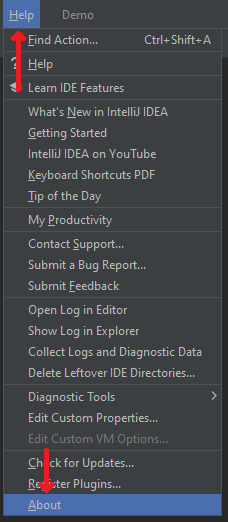
- Go to Help > About
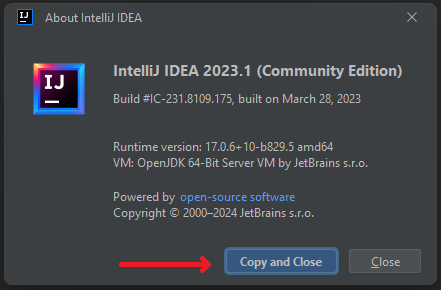
- Click Copy and Close button and save this information somewhere for later
After that, there are a few steps that could be possibly done to fix the issue:
- If the issue details are clear and IDE says, which component it is - copy all the related information and send it to the component's developer
- If the issue is unclear - try to reload IDE / your computer. If the problem persists, try to reinstall the IDE or install the newest one supported LTS version of the IDE you are using
- Ask for help or search for the related issue - there is an issue tracker, related to the IntelliJ IDEA issues. Try to find something related or create a new one
Troubleshooting the plug-in
If you have an issue with the plug-in:
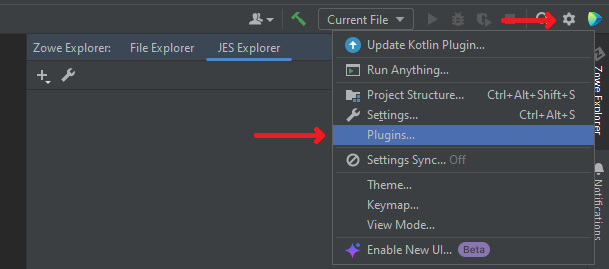
- Click the gear button, select Plugins...
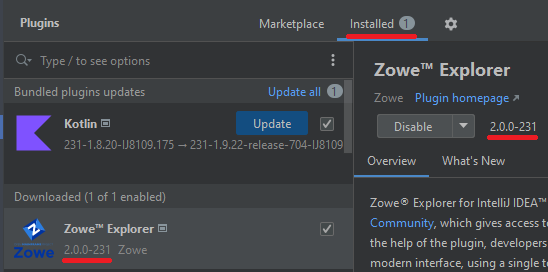
- Go to Installed tab, locate the plug-in, save the exact version number
After these actions, you have some options to try:
- If the problem occurs for the plug-in in editor - try to close the file you are editing, refresh the path and open it again
- If the problem occurs with displaying a mask or a filter - try to hit refresh on a working set or try to recreate a connection and a working set
- If the problem occurs for some other issues related to Files Explorer or JES Explorer - try to recreate a new connection, and a new working set for it
- If the problem occurs for TSO Console - try to reopen the session, try to recreate a session entirely
- Other non-related issues, e.g. if the problem occurs for encoding or permissions or "Internal IDE error" notification appears constantly - copy all the necessary information about the IDE you use and the plug-in's version, create a new issue listing all the necessary information (like the steps to recreate the issue) as well as the versions, or search for the related issue in the repository and put a thumb-up for it, so we know that it should have a higher priority
If you want a direct consulting, don't hesitate to visit our Slack channel and leave a message. Our team is always willing to help with any issues related to the platform or the plug-in, no matter the size of an issue or a question.